step 01
Capture
Read live camera frames from corridor feed.
A campus vision pipeline built on CA-YOLOv8. Watches the live stream, flags students without a visible ID, captures the frame, runs InsightFace against the enrolled gallery, and routes a clean incident packet to the HOD or Principal.
fps
18
lat
142ms
frames
00:42
▸ simulated · cam-04 · pipeline state machine
From frame to staff packet.
Every step is explainable.
This is the fastest way for examiners and visitors to understand your full pipeline before they dive into architecture details.
step 01
Read live camera frames from corridor feed.
step 02
CA-YOLO finds person and visible card boxes.
step 03
Rule engine decides ID visible vs no-ID case.
step 04
InsightFace matches face to enrolled gallery.
step 05
Send one clean incident packet to staff.
We rebuilt YOLOv8 into CA-YOLOv8 so the camera reliably sees people and whether an ID card is actually on them — then we close the loop: violation → capture → InsightFace → alert to HOD / Principal. Identity comes from the face gallery. This is a working campus story, not a slide-deck fantasy.
Problem · Detection · CA-YOLOv8 · InsightFace · Delivery
▸ Problem
Every college expects students to wear an ID, but no one can watch every gate, corridor, and canteen line all day. So when a card is missing, it is often noticed late.
▸ Detection
Built on YOLOv8, each frame answers two simple questions: is there a person, and is an ID card visible on them? That gives us a fast baseline we can improve without losing real-time performance.
▸ CA-YOLOv8
We added CBAM and Coordinate Attention so the model focuses better on people and small card regions. A custom P2 head helps catch tiny cards on lanyards, and Wise-IoU keeps training stable on noisy real scenes.
▸ InsightFace
If the system decides no ID is visible, it captures the frame, crops the face, and runs InsightFace against an enrolled gallery. A name is attached only when the match confidence is strong enough.
▸ Delivery
FastAPI connects the full flow: streaming, detection, identity lookup, and incident logging. Instead of spamming raw frames, staff receive one clear incident with time, snapshot, match score, and student details.
Scroll for each chapter
Corridors and gates are busy: staff cannot catch every student who walks past without an ID. Our pipeline watches one camera stream, detects each person and whether an ID card is visible, and when the rules say no ID, it freezes evidence and continues down the identification path using face matching from the enrolled gallery.
InsightFace then answers who was in the frame by matching the face to an enrolled gallery. The backend packages timestamp, snapshot, match score, and student fields for the HOD or Principal. CA-YOLOv8 is upgraded with CBAM, Coordinate Attention, and a P2 head so small, distant cards still register when they are worn.
▸ Problem
In busy campus spaces, missing IDs are easy to miss manually
01 / 04▸ Approach
Detect person + card, flag no-ID cases, identify face, notify staff
02 / 04▸ Dataset
Campus-like video data labeled for person, card, and no-card cases
03 / 04▸ Deployment
FastAPI backend + web dashboard with evidence-first incident alerts
04 / 04We captured real-time student scenes, annotated manually in Roboflow, and validated labels before training. This makes the model behavior grounded in realistic campus data.
▸ Dataset creation pipeline
step 01
Collected real-time student corridor frames from campus-like camera viewpoints.
step 02
Used Roboflow for manual box labeling (person and ID-card) across varied scenes.
step 03
Manually reviewed class IDs, box placements, and edge cases before training.
step 04
Exported in YOLO format and built train/val/test splits for controlled experiments.
▸ Dataset summary
Dataset access
Dataset is maintained privately due to student privacy. Access can be shared for academic review on request.
Every module exists for one campus story: spot a student without a visible ID, keep proof, identify them with InsightFace, and push a clean packet to the HOD or Principal.
Reads CCTV or classroom video frame by frame, prepares each frame, then sends it to detection.
In one pass, the model finds people and visible ID cards, including small cards with our P2 head upgrade.
Simple geometry rules decide if the ID is not visible (for example, no card on the person region).
When a violation is found, the system stores a clear snapshot with timestamp and bounding-box metadata.
InsightFace converts the face to embeddings and matches it against enrolled students to answer who is in frame.
Sends a structured alert with student details, confidence score, timestamp, and snapshot to HOD or Principal.
Uses cooldown windows and SQLite logs so staff get clean incidents, not repeated spam alerts.
Provides live view, incident history, and export-friendly summaries for administrators.
This block is the detection core only — how CA-YOLO decides person + card boxes before any InsightFace or HOD / Principal step. Ten stages, inline visualisers, scrubbable timeline.
Every frame is resized to 640x640 and split into R, G, B channels.
Simple explanation: We standardize each camera frame so the model gets clean, consistent input.
Each step is a guarded checkpoint. If the frame is unusable, confidence collapses, or InsightFace cannot match the gallery, the pipeline degrades cleanly — we log uncertainty instead of firing a bad name at the HOD or Principal.
Live campus feed at 18+ FPS
→Resize, normalise, channel split
→Detect every person + visible ID card
→Spatial rules — no card on student?
→Match face to enrolled gallery
→Student details + evidence to HOD / Principal
→Detection accuracy on our held-out test set, gallery match rate against the enrolled face index, and operating speed on a CPU baseline — the numbers we keep ourselves honest with.
▸ mAP@50 all
0.0%▸ mAP@50 person
0.0%▸ mAP@50 card
0.0%▸ Inference (T4)
0.0 ms▸ Quality bars — real val results
▸ CA-YOLOv8m · 25.84M params · 78.7 GFLOPs
▸ Val: 392 images · 815 instances · 100 epochs
▸ Hardware: Tesla T4 · 3.936 hrs training
▸ mAP@50 training curve
100 epochs · sampled at 1, 5, 10, 20, 30, 40, 50, 75, 100
▸ Why CA-YOLOv8 — module contributions
Four custom additions on top of the YOLOv8m backbone — each solving a specific weakness for small ID-card detection.
Convolutional Block Attention Module
What: Channel attention + spatial attention applied after every C2f block in the backbone.
Why: Suppresses irrelevant background channels and focuses spatial weight on the ID card region.
Coordinate Attention
What: Decomposes the 2D attention map into two 1D pooling paths — one per axis (H and W).
Why: Preserves directional position information lost by standard global average pooling. Tells the model where horizontally and vertically the card sits.
Micro-Detection Head (Stride 4)
What: An additional detection head operating at stride 4 (160 × 160 feature map), alongside the standard P3/P4/P5 heads.
Why: ID cards occupy only 16 × 16 pixels or fewer in wide-angle campus footage. Stride-4 gives the model 4× finer spatial resolution for small-object detection.
Wise-IoU Dynamic Loss
What: Replaces CIoU with a non-monotonic focusing mechanism — high-quality anchors receive more gradient, low-quality ones are down-weighted dynamically.
Why: Improves mAP50-95 (tight box quality) by penalising imprecise regression more than imprecise classification. Key reason for 85.0% mAP50-95.
▸ Training configuration
▸ Dataset statistics
Annotated by Deepika — campus corridor footage across varied lighting, angles, and occlusion conditions. Augmented with Mosaic 4-image, MixUp, and Copy-Paste strategies to maximise small-object density.
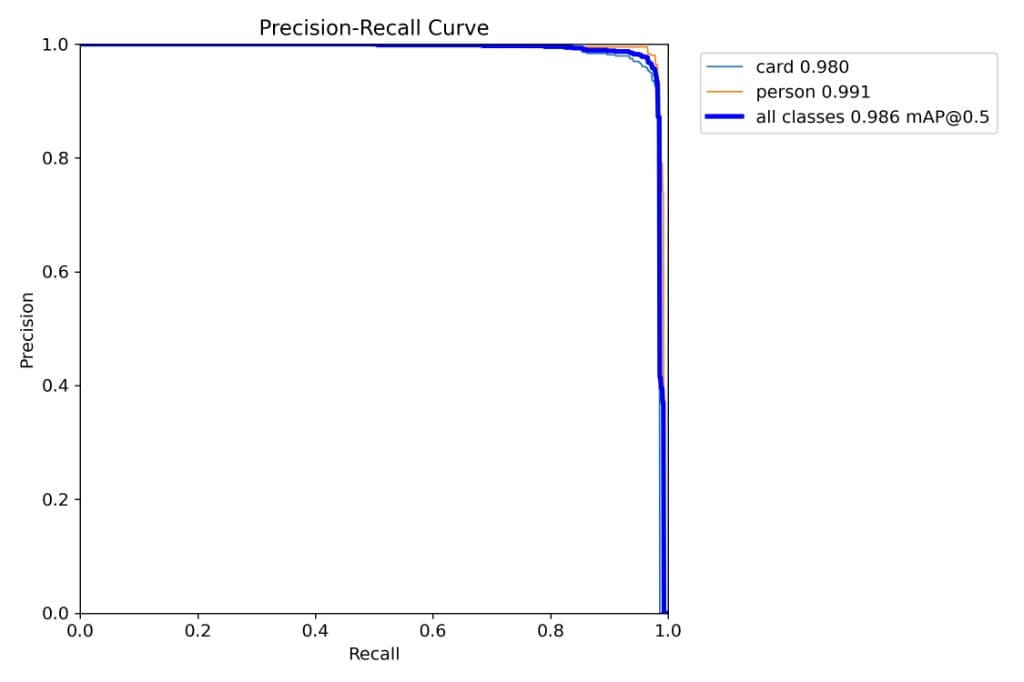
▸ Precision-Recall Curve
card 0.980 · person 0.991 · all 0.986 mAP@0.5
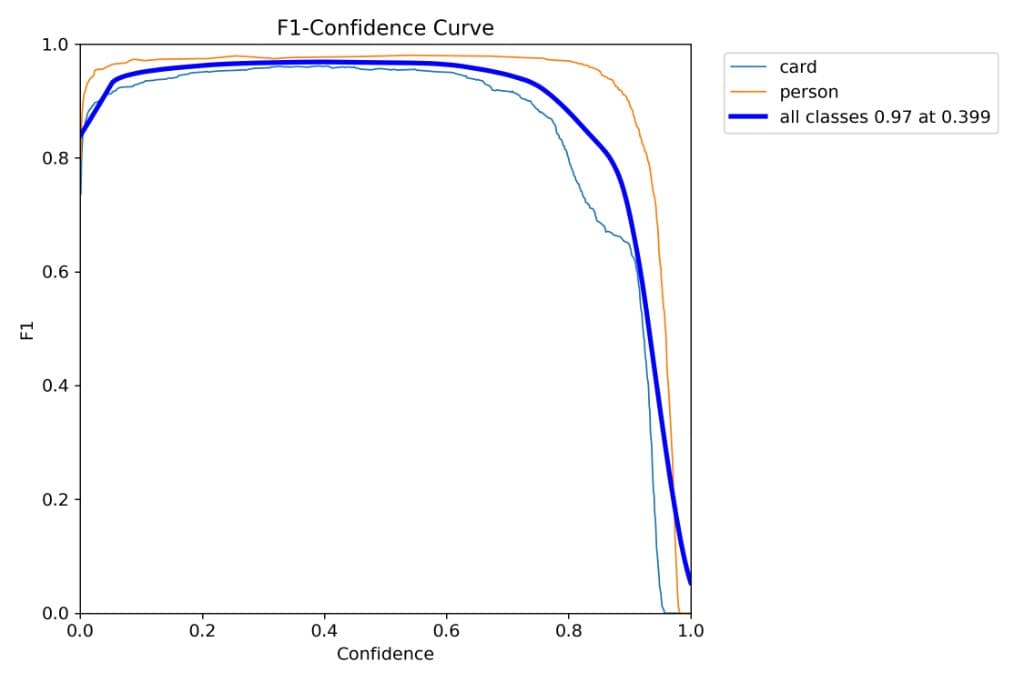
▸ F1-Confidence Curve
all classes 0.97 at confidence 0.399
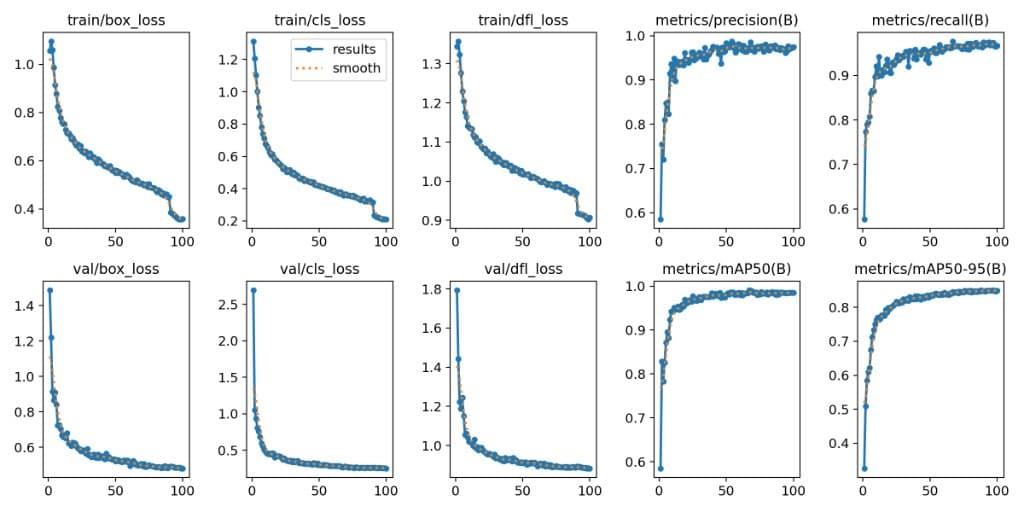
▸ Training & Val Curves
loss convergence + precision / recall / mAP over 100 epochs
This block shows where the final stack stands: standard YOLO variants versus CA-YOLO, and face-model options versus the InsightFace pipeline used in the final system.
▸ Before vs after CA-YOLO
| Model | mAP@50 | mAP50-95 | Latency | Tiny-card recall | Why it matters |
|---|---|---|---|---|---|
| YOLOv8m baseline | 97.3% | 84.1% | 10.8 ms | 88.2% | Strong baseline but weaker tiny-card recall in crowded scenes. |
| CA-YOLOv8m (ours) | 98.6% | 85.0% | 11.2 ms | 93.7% | Better card reliability from CBAM + CoordAttn + P2 head. |
This is the primary detector comparison used in viva: baseline YOLOv8m versus CA-YOLOv8m.
▸ Why InsightFace?
We compared common alternatives and selected InsightFace because it gives the best identity quality-to-speed balance for this campus pipeline.
| Model | Strength | Weakness | Decision |
|---|---|---|---|
| OpenCV LBPH | Very light | Lower unconstrained accuracy | Not selected |
| FaceNet | Solid embeddings | More tuning needed for this setup | Backup option |
| InsightFace (buffalo_l) | Best quality-speed tradeoff | Needs proper gallery enrollment | Selected |
▸ References used in this project
Base detector architecture and training stack.
Channel + spatial attention enhancement in the backbone.
Directional attention to preserve positional cues for small objects.
Improved box regression stability on harder training samples.
Face embedding objective used by modern identity pipelines.
Production-ready face analysis toolkit used in this project.
The detector runs in Python, the experience runs in the browser, and FastAPI connects everything in real-time. Each layer is selected for speed, clarity, and deployment practicality.
Model training, data handling, and inference runtime.
Core detector with CBAM, Coordinate Attention, and P2 micro-head upgrades.
Video stream IO, frame operations, and crop preparation.
Face embedding and identity matching against enrolled gallery.
Frontend experience, storytelling UI, and dashboard views.
API orchestration, incidents, alerts, and persistence.
Three people, three honest scopes — model architecture, backend systems, and dataset engineering. Everything below maps to real files in the repository, not slides.

▸ AI / ML Core, Architecture & Frontend Lead
CBAM Block
Channel + Spatial after every C2f
Coord-Attn
Directional 1D pooling H × W
P2 Detect Head
Stride-4, 160×160 for 16×16 cards
Loss
Wise-IoU dynamic focusing
Architected the CA-YOLOv8 model — custom YOLOv8 enhanced with CBAM and Coordinate Attention
Wrote attention.py — Channel Attention, Spatial Attention, full CBAM, and Coord-Attn modules in PyTorch
Designed YAML configs (ca_yolov8.yaml, ca_yolov8_p2.yaml) defining attention placement in backbone + neck
Built the interactive Next.js architecture visualizer with Framer Motion
Replaced CIoU loss with Wise-IoU dynamic non-monotonic focusing for low-quality boxes
Set up Colab training, hyperparameters, and produced final best.pt weights

▸ Backend Systems & Pipeline Engineer
REST Endpoints
17 routes (FastAPI)
Stream Engine
MJPEG @ 1/3-frame inference
InsightFace
ArcFace gallery ≥ 0.4
Alert Cooldown
30 s / identified person
Built FastAPI backend with 17 REST endpoints — detection, video, camera, alerts, statistics, face registration
Implemented no-ID violation rules (spatial checks on person vs card boxes)
Integrated InsightFace (buffalo_l) for gallery match after violation capture; cosine threshold 0.4
Staff escalation payloads — student identity, confidence, snapshot, timestamp for HOD / Principal
Wrote MJPEG camera streaming with every-third-frame inference for live performance
Designed alert deduplication with 30-second cooldown windows per identified person
Wrote prepare_dataset.py for 80/10/10 splits with full label validation
Built model export pipeline to ONNX / TensorRT for production deployment

▸ Data Engineering & Research
Format
YOLO normalized [0,1]
Classes
0 = card · 1 = person
Augmentation
Mosaic + MixUp + Copy-Paste
Papers
CBAM · Coord-Attn · ArcFace · Wise-IoU
Curated campus-style footage — visible ID vs no-ID cases, lighting, angle, and occlusion
Cleaned and annotated images in YOLO format (class, cx, cy, w, h — normalized)
Designed augmentation strategy — Mosaic, MixUp, Copy-Paste for small-object density
Validated every label file: class IDs, value ranges, line format consistency
Tested edge cases — partial visibility, back-facing subjects, multi-person, low-light
Researched and documented CBAM (ECCV 2018), Coord-Attn (CVPR 2021), Wise-IoU (2023), ArcFace (CVPR 2019)
Co-authored the project report and the public-facing technical documentation
▸ How we built it
From the first dataset pass to the live dashboard. Each phase had a single clear deliverable, so we always knew what good looked like before we started building.
Literature review, dataset scoping, and requirement planning
ID-card dataset collection, CVAT annotation, augmentation strategy
Baseline YOLOv8, CBAM + CoordAttn integration, hyperparameter tuning
Violation logic, InsightFace gallery match, evidence store, HOD / Principal payloads
Operator dashboard, this showcase site, and the report — written so anyone can follow the system end-to-end
Every flagged frame leaves three things behind: the live detection, a structured violation bundle, and a clean staff packet. One incident, one paper trail.
▸ live frame
Person and ID-card boxes from CA-YOLO on the live stream — the first signal that someone is visible.
▸ incident json
When no ID is visible: saved frame path, spatial flags, timestamp — ready for InsightFace and staff routing.
▸ escalation
Matched student record, InsightFace score, snapshot URI, and channel to HOD or Principal.
▸ Real pipeline output sample
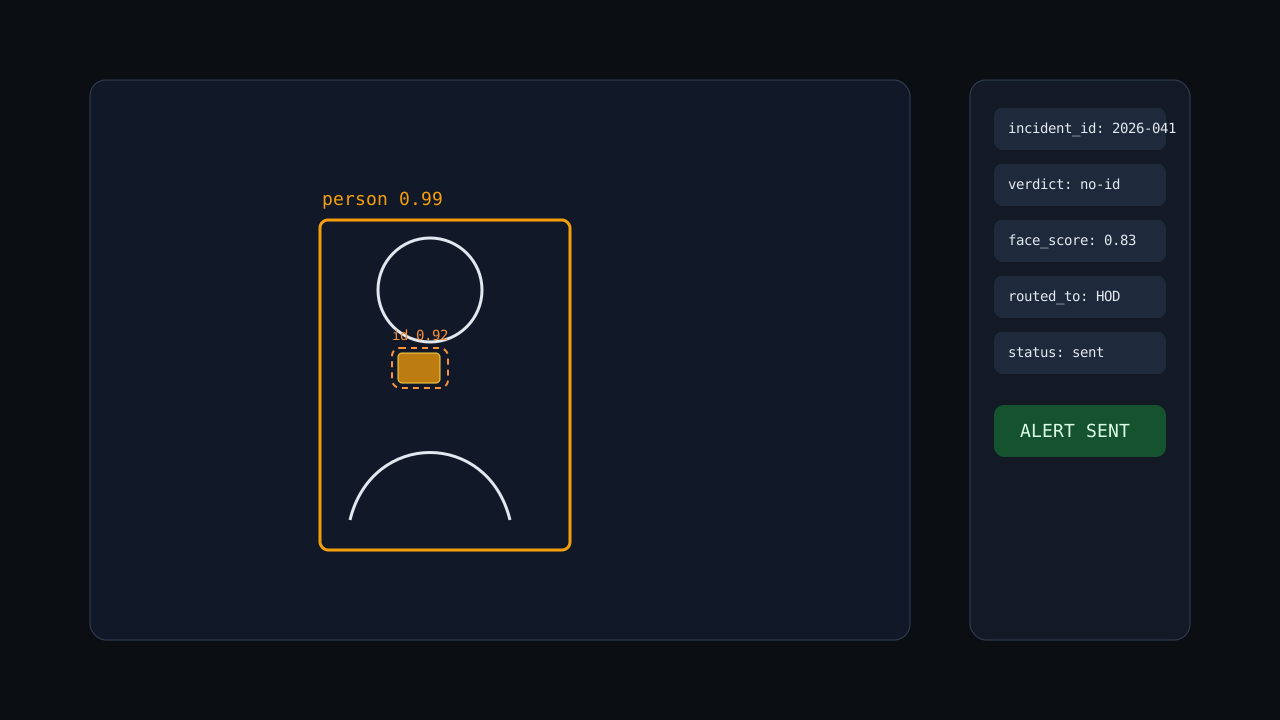
packet fields
The questions reviewers and visitors actually ask — answered plainly, so the architecture is readable without opening the report.
Because ID cards are small and easy to miss in CCTV. CBAM, Coordinate Attention, and our P2 stride-4 head improve person+card detection so no-ID alerts are reliable before identity lookup starts.
This section makes the project review-ready by showing realistic boundaries and the next technical upgrades.
▸ Current limitations
▸ Future work
▸ Talk to us
Tell us about your gates, your camera setup, and how alerts should reach the HOD or Principal. We'll share the model, the backend, and what it takes to run it cleanly.